Last reviewed:
How to Pay the U.S. Visa Fee in the Philippines
The DS-160 itself has no submission fee. Applicants in the Philippines pay the separate nonimmigrant visa application (MRV) fee through the official U.S. visa appointment service before an interview can be scheduled.
Payment methods in the Philippines
The official Philippines payment options page currently lists four methods:
- Cash at any RCBC branch: print the payment instruction page from your profile, pay at the counter, and verify the reference number and amount on the validated receipt before leaving.
- QRPH mobile payment: scan a QR code with your mobile banking app or eWallet from the payment page.
- Credit/debit card in PHP: secure online checkout billed in Philippine pesos.
- Visa credit/debit card in USD: billed in U.S. dollars via a hyperlink at checkout — your bank may add foreign transaction and currency conversion fees, and the billing address must match your card exactly.
Official reference: the Philippines bank and payment options page lists RCBC cash, QRPH, PHP cards, and USD Visa cards, and states you can schedule your interview about four hours after a cash payment. Check the live page before paying.
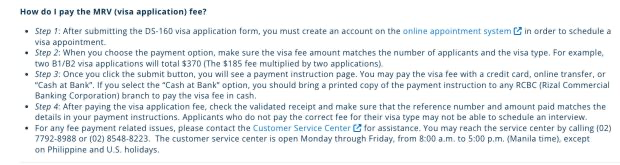
Official U.S. Visa Information and Appointment Services page for the Philippines. Check the live page before paying — methods and activation times change.
Step-by-step payment process
- Submit the DS-160 and save the confirmation page.
- Create a profile on the official Philippines visa service and select Start Application.
- On the Payment Options page, verify the number of applicants, visa type, and amount before submitting — underpaying for your visa class can block scheduling.
- Pay with one method: RCBC cash (bring the printed instruction page), QRPH scan, PHP card, or USD Visa card.
- For RCBC cash payments made between midnight and 3:00 p.m., the receipt is issued the same day and you can book 4–24 hours after payment.
- Log back into your profile, choose Continue Application to claim the receipt, and schedule your interview.
Philippines-specific payment rules
- The fee is non-refundable and non-transferable, whether or not a visa is issued.
- If a payment seems to fail, do not pay again — email support-philippines@usvisascheduling.com with your reference and let them investigate. Duplicate payments are not refunded.
- The PHP amount is set by the U.S. Department of State's consular exchange rate, not your bank's rate.
- A fee receipt is normally usable for scheduling for one year from the payment date.
- Reschedules are limited — plan your appointment carefully so you don't have to pay a second fee.
- F, M, and J students and exchange visitors also owe a separate SEVIS fee paid on fmjfee.com — the MRV payment does not cover it.
- If a reciprocity fee applies to you, bring the means to pay it to the interview. The Philippines payment page says the visa issuance ("reciprocity") fee is paid to the cashier at the Consular Section on the day of the interview — not online in advance like the MRV fee. Most applicants owe nothing; check the reciprocity schedule for your nationality and category before you go, because this is the one charge the prepaid flow does not cover.
Questions commonly searched in the Philippines
Can I pay the U.S. visa fee with GCash or Maya?
Use the QRPH mobile payment option on the payment page: it displays a QR code you scan with a participating mobile banking app or eWallet. Pay only through that flow — do not send an ordinary wallet transfer.
How much is the U.S. visa fee in pesos?
The fee is set in U.S. dollars — $185 for B visitor and F/M/J student visas, higher for petition-based work visas — and converted to PHP at the consular exchange rate shown at checkout. Confirm the current amount on the Department of State fee schedule.
How soon can I book my interview after paying?
RCBC cash payments activate within 4–24 hours. Online card and QRPH payments generally activate quickly as well; claim the receipt in your profile with Continue Application once it appears.
My RCBC receipt has the wrong amount or reference number. What do I do?
Ask the branch to correct it before you leave the bank. A mismatched reference or amount can prevent the payment from being matched to your profile.
Can I use a fee paid in the Philippines for an interview in another country?
No. A fee paid through the Philippines system is tied to applying in the Philippines. If you switch countries, expect to create a profile in that country's system and pay again.
Already in the United States? If you are renewing while on another visa, see paying the fee when you apply from the United States.
Paying from a nearby country
The bank, currency and appointment service differ by country — if you are applying somewhere else in Southeast Asia, use that country's guide:
- Paying the visa fee in Indonesia
- Paying the visa fee in Vietnam
- Paying the visa fee in Thailand
- Paying the visa fee in Malaysia
- Paying the visa fee in Singapore
Related guides
- U.S. visa fee overview and current amounts
- DS-160 form guide
- DS-160 photo requirements
- Find your embassy or consulate
Booking the interview
Once the fee activates, see booking a U.S. visa appointment in the Philippines.